

- Sagemcom water meter
Press the blue button to display the data on the screen.
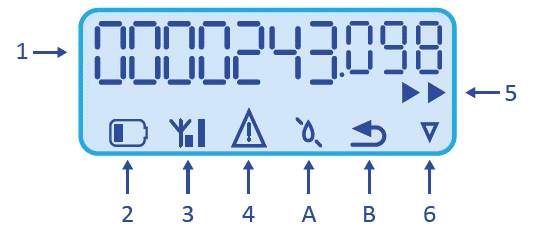
- Your water consumption: before the full stop, you see the number of m³; after the full stop, you see the number of litres. In this example, 243.098 m³ or 243,098 litres.
- Your water meter's battery is running low.
- Your water meter is connected to your electricity meter.
- One of the following notifications is active:
A. No water is flowing through your water meter.
B. Water from your internal installation is flowing back. Your central backflow preventer may not be working or may be malfunctioning. - Water is flowing through your water meter.
- This symbol shows that the water meter measures according to legal guidelines.
- Integra water meter
The screen alternately displays the 2 information screens shown.
Image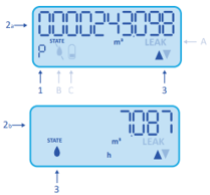
1. The counter displays your meter reading when 'P' is visible.
2. a. Your meter reading: before the full stop, you see the number of m³; after the full stop, you see the number of litres. In this example, 243.098 m³ or 243,098 litres.
2. b. Water meter flow rate: number of m³ of water flowing per hour through the meter.
3. If the triangle pointing up is visible, water is currently flowing through your water meter. The trickle also lights up.
If both triangles light up, water is flowing back from your internal installation. Your central backflow preventer may not be working or may be malfunctioning.In case of problems, the following symbols light up:
A. LEAK: higher than average consumption has been measured. This may indicate a leak.
B. This symbol is active when there are air bubbles, a crack, overheating or when no water flows through your water meter .
C. Your water meter's battery is running low.